For a Pop starting point on your Tesla Model 3’s EQ (equalizer), try Sub +1, B +1, B/M 0, M +1, M/T +1 and T +1, reading from left to right. If your screen has no Subwoofer control, omit Sub. Compare with all sliders at zero before keeping the change. The tables below also cover Rock, EDM, Hip-hop, Classical and Jazz.
This guide covers the 2017–2023 Model 3 manual family and the refreshed family covered by Tesla’s North American 2024+ manual, also called Highland. These are manual groupings, not a guarantee about launch dates or audio equipment in every country. Check your actual controls and configuration before choosing a preset.
The figures are editorial listening starting points, not Tesla-approved settings or results from Model 3 frequency-response measurements or controlled listening tests. The equipment and operation references were checked on November 16, 2026.
Jump to: with-Subwoofer presets · without-Subwoofer presets · setup steps · older Model 3 and Highland · fine-tuning.
Recommended Model 3 EQ settings by music genre
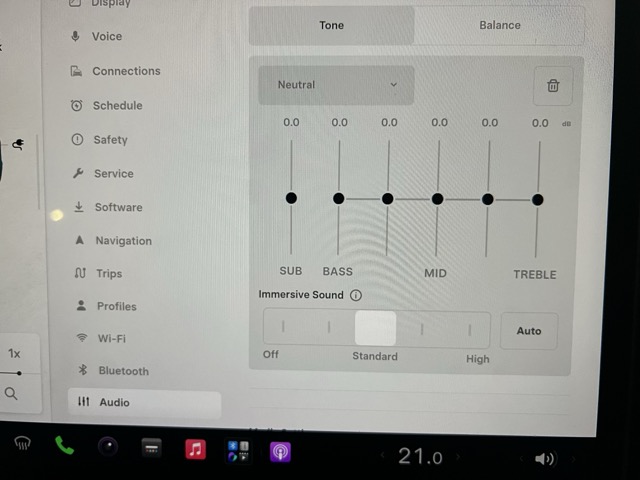
While parked, save a neutral reference: Subwoofer at zero if available, all five Tone bands at zero, and Balance centered. Zero is a useful comparison point; it does not mean the sound at your seat has a measured flat frequency response.
The numbers are target screen values, not extra boosts to add to an existing preset. Start from neutral and use the closest available value if your interface differs. Keep the source, track, listening volume, seating position, Balance and Immersive Sound unchanged during a comparison.
Read the controls in this order: Sub = Subwoofer, B = Bass, B/M = Bass/Mid, M = Mid, M/T = Mid/Treble, T = Treble. Sub comes first where equipped; without it, begin at B. The abbreviations keep the tables readable, while the control descriptions below explain what to listen for.
All photos were taken in a 2024 Model 3. Click a photo to open the original.
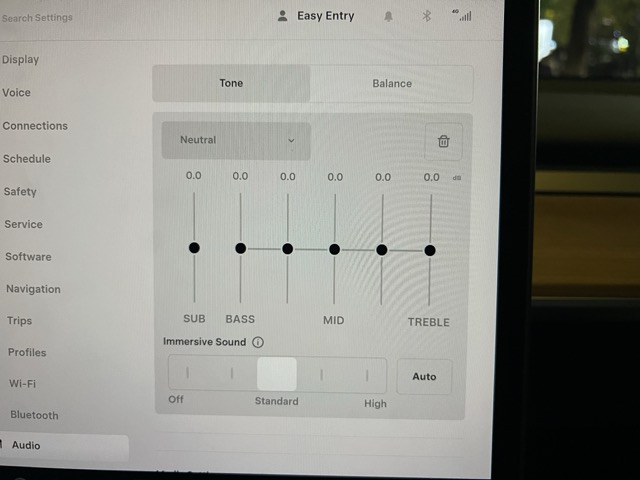
Model 3 with a separate Subwoofer control
Try these with original audio equipment and the corresponding controls. They express modest tonal preferences, rather than corrections for a specific speaker layout. A matching screen in an older Model 3 or Highland lets you try the same starting curve; it does not establish that the two systems sound the same.
| Music | Sub | B | B/M | M | M/T | T |
|---|---|---|---|---|---|---|
| Pop | +1 | +1 | 0 | +1 | +1 | +1 |
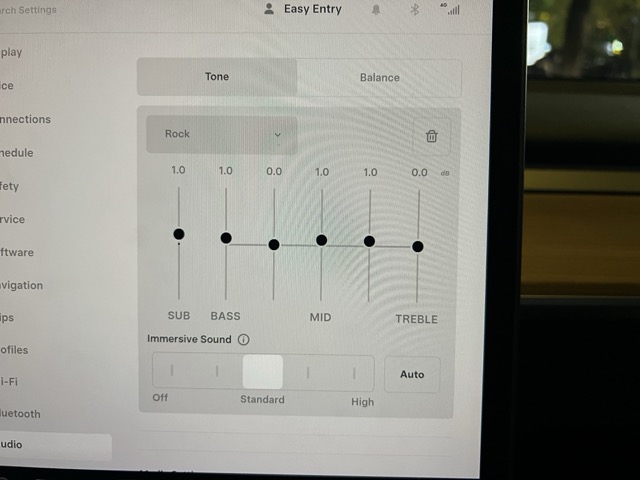
| Rock | +1 | +1 | 0 | +1 | +1 | 0 |
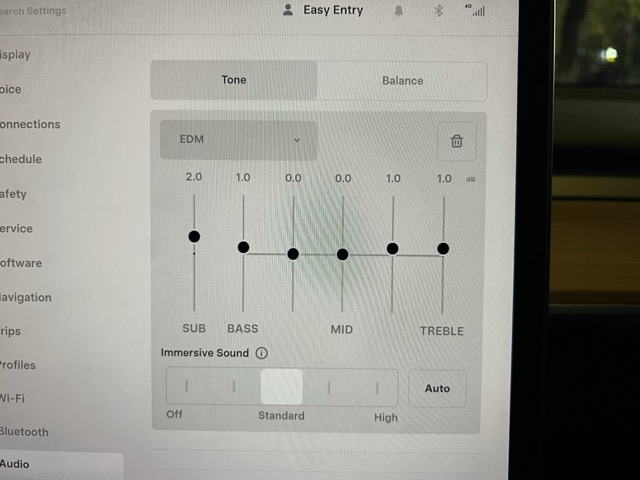
| EDM | +2 | +1 | 0 | 0 | +1 | +1 |
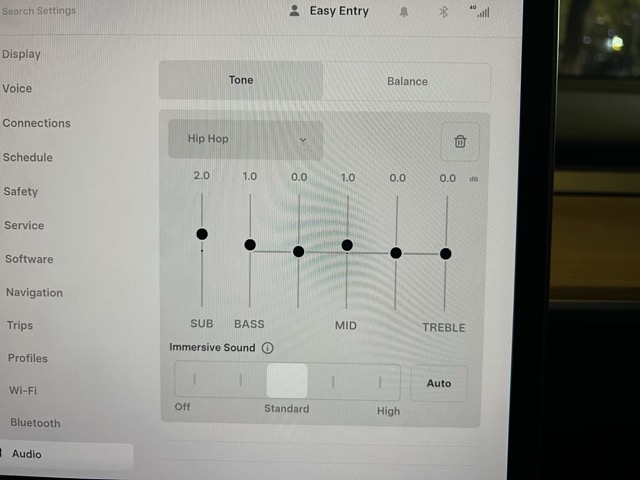
| Hip-hop | +2 | +1 | 0 | +1 | 0 | 0 |
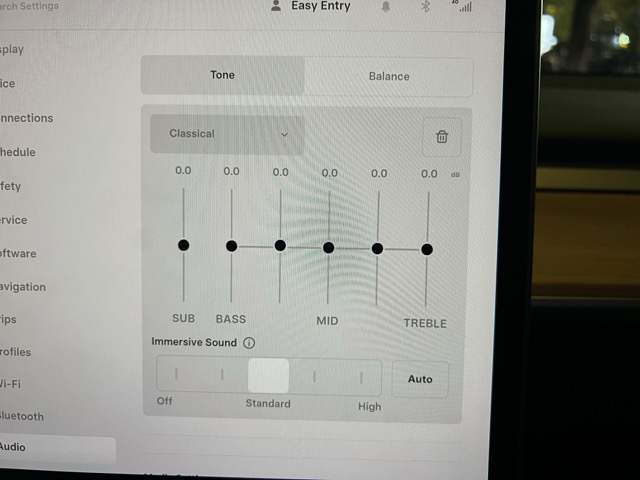
| Classical | 0 | 0 | 0 | 0 | 0 | 0 |
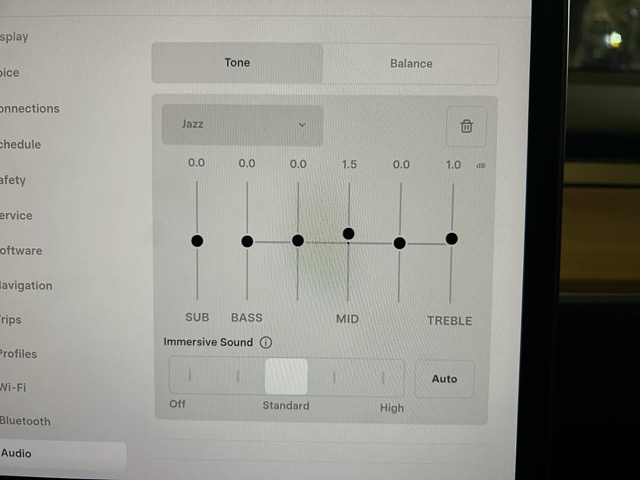
| Jazz | 0 | 0 | 0 | +1 | 0 | +1 |
Model 3 without a separate Subwoofer control
Use this table if the control is absent. A Standard Range, Standard Range Plus, RWD or Long Range badge alone is not enough to select an audio curve across different years and markets.
| Music | B | B/M | M | M/T | T |
|---|---|---|---|---|---|
| Pop | +1 | 0 | +1 | +1 | +1 |
| Rock | +1 | 0 | +1 | +1 | 0 |
| EDM | +1 | 0 | 0 | +1 | +1 |
| Hip-hop | +1 | 0 | +1 | 0 | 0 |
| Classical | 0 | 0 | 0 | 0 | 0 |
| Jazz | 0 | 0 | +1 | 0 | +1 |
The five Tone values deliberately remain the same. Do not transfer a missing Sub +2 to Bass. Raising Bass is not an equivalent replacement for a subwoofer. For EDM or Hip-hop, compare B +2 separately only if B +1 still sounds too light. Return to +1 if bass notes blur, voices become harder to follow or you hear rattles.
Pop: a little more beat and vocal presence
The small M and M/T lifts aim to bring the singer forward, while the low-end lift gives the beat more weight. B/M stays at zero to avoid deliberately adding thickness around the voice. If consonants or vocal sibilance become sharp, compare M/T 0 first.
Use several familiar recordings, not only one bass-light song. A densely produced Pop track may already have enough low-end; try Sub 0 before increasing the voice bands further.
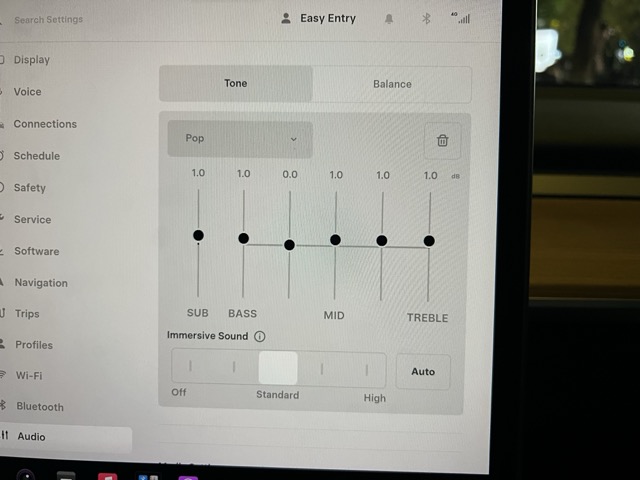
Rock: drum weight without extra top-end brightness
This curve aims to give drums some weight and keep guitars and vocals audible in a busy arrangement. T stays at zero: the emphasis is on presence rather than additional high-frequency brightness. If distorted guitars or snare hits become tiring, reduce M/T from +1 to 0. If the mix feels congested, restore the reference and separately compare B/M −1.
Keep the change that helps across several tracks. A recording with prominent cymbals may need less upper-band emphasis than another Rock recording in the same car.
EDM: fuller bass with a clear comparison point
Sub +2 provides the largest low-end emphasis among these starting presets. B remains at +1 and M at zero, with small upper-band lifts for attack and brightness. If bass dominates the melody, reduce Sub to +1 before boosting other bands to compete with it.
With no Sub control, use the second table and judge B on its own. If more Bass mainly adds vibration or obscures the track, return toward neutral rather than treating a larger number as an upgrade.
Hip-hop and R&B: bass weight with a softer upper range
The Sub and B lifts aim to give the bass line weight; M +1 provides a small vocal emphasis. M/T and T stay at zero for a softer alternative to the EDM curve. If lyrics become harder to follow, lower Sub from +2 to +1 before adding more Mid.
Listen for individual bass notes as well as impact. If every note seems to merge into the next, less low-end can be a more useful first comparison than another boost.
Classical: neutral before selective adjustments
All zeros is the recommendation here. Hear the recording’s balance before choosing to emphasize a section of the orchestra. If strings are sharp in your car, separately compare T −1. If low-end overwhelms quieter passages, try Sub −1 where available.
Neither change is required just because the music is Classical. Keep a setting only if it also suits other recordings; EQ does not make quiet and loud passages interchangeable.
Jazz and acoustic music: a small lift for voices and detail
M +1 and T +1 aim to bring voices, instruments and cymbal detail slightly forward, with no added low-end weight. If piano or voices become too prominent, compare M 0. If cymbals are sharp, compare T 0 instead. Change one band at a time.
These are preference choices. The same restrained curves also appear in our Model Y guide; shared starting values do not mean the cabins sound identical. Use the equipment checks and listening comparisons below to choose your own final values.
The general approach of gentle boosts, reducing an excess and judging the whole recording is consistent with iZotope’s explanation of EQ cuts and boosts. Its production advice does not validate a Model 3 preset or identify Tesla’s exact filter frequencies.
How to change the EQ in a Model 3
- Park and photograph the current values before changing anything.
- Open Controls > Audio, or use the settings icon above the bottom volume controls where available.
- Open Tone and return the available sliders to their neutral positions.
- Center Balance. Keep Immersive Sound fixed while comparing Tone curves.
- Apply one genre starting preset, then compare it with neutral on the same passage at a consistent, comfortable volume.
- Fine-tune one control by its smallest available step. Check two or three other familiar tracks before keeping the result.
- Save a named custom preset if your software supports it, or keep a photo of the final values.
The current 2017–2023 Media guide and refreshed Model 3 Media guide document these controls. They describe today’s manuals for those vehicle families, not a promise that every historical software version had the same screen.
What the Tone controls change
Use these as listening cues rather than exact filter-frequency specifications. Evaluate one change in the full recording before moving another slider.
| Control | Listen for |
|---|---|
| Sub, if present | Low-end weight. Keep it fixed when comparing a Bass change. |
| B / Bass | Kick-drum and bass-note weight; check whether voices remain clear. |
| B/M / Bass/Mid | Warmth and thickness; too much emphasis can sound congested. |
| M / Mid | The body of voices and instruments; compare the whole arrangement. |
| M/T / Mid/Treble | Presence and attack; check guitar edges, snare hits and consonants. |
| T / Treble | Brightness and detail; check cymbals and vocal sibilance for sharpness. |
Balance sets where sound is focused in the cabin. Immersive Sound, where equipped, changes its presentation. Neither is a substitute for checking the Tone curve; compare them separately.
Older Model 3 vs. Highland: check the equipment first
What the generation labels mean
Tesla provides separate manuals for 2017–2023 Model 3 and 2024+ Model 3 in North America. It also separates the older car in its Meet Your Model 3 instructions. Use the matching vehicle family and your on-screen manual, rather than assuming a registration year identifies the hardware.
| Vehicle family | Recommended starting choice | What to recheck |
|---|---|---|
| Older Model 3, in the 2017–2023 manual family | Choose the genre table matching your actual Sub control. | Current software, factory equipment, modifications and the controls present. A 2021 or 2022 vehicle does not need its own curve just because of its year. |
| Refreshed Model 3 / Highland, covered by the North American 2024+ manual | Establish neutral in that car, then compare the same genre starting points. | Do not import an older car’s final curve without listening again. Manual-family years are not a worldwide launch-date rule. |
| Either family with upgraded speakers, an amplifier or DSP | Begin near neutral and follow the equipment maker’s instructions. | Reassess the modified system; these factory-equipment suggestions do not describe its tuning. |
Tesla’s upgraded Model 3 overview describes acoustic glass and a quieter cabin. That is a reason to reassess a familiar setting, not a numerical correction. Its market-specific presentation does not establish the equipment of every later Model 3 trim.
Neither Media manual supplies a fixed EQ offset between an older Model 3 and Highland. Without a controlled comparison or measurements of the actual configurations, we cannot say that Highland universally needs a particular extra amount of bass or treble.
RWD, Standard Range Plus, Long Range and Performance
Treat these as vehicle names to help find the right documents, not a substitute for checking audio equipment. RWD does not, by itself, identify one universal Model 3 sound system, and Long Range is not a sufficient audio specification across all years and markets.
Check whether the screen offers a separate Subwoofer control and Immersive Sound. Confirm whether the car still has its original speakers and amplification. Tesla’s feature availability statement explains that market, configuration, options and software affect which features are available.
If you are checking a car before buying it, inspect that particular car and its documents. A screenshot from another RWD, Long Range or Performance can demonstrate an interface without proving that it matches the car in front of you.
How to adapt the starting curve
For an older Model 3 with Sub, playing Rock, start with +1 / +1 / 0 / +1 / +1 / 0. If guitars are sharp, compare +1 / +1 / 0 / +1 / 0 / 0, changing only M/T.
For a Highland with Sub, playing EDM, start with +2 / +1 / 0 / 0 / +1 / +1. If bass masks the melody, compare +1 / +1 / 0 / 0 / +1 / +1, changing only Sub. The same comparison can help an older car with matching controls; it is not a Highland-only correction.
For either generation without Sub, playing Pop, use +1 / 0 / +1 / +1 / +1 in B / B/M / M / M/T / T order.
All six-value examples use Sub / B / B/M / M / M/T / T. Use one observed problem to choose the next change, rather than adding all suggested corrections together.
Fine-tune bass, vocals and treble
Bass is too strong or the rear of the car rattles
Lower Sub first if present, holding B fixed. Without Sub, try a small B reduction. Replay a passage with distinct bass notes and check whether the line remains audible without overwhelming the singer. If a noise persists at moderate volume and neutral EQ, seek help identifying it rather than repeatedly adding EQ to compensate.
Vocals sound buried or the mix feels thick
Try a small B/M reduction before raising several upper bands. If it does not help, restore it and separately try M. Voices should become easier to follow without losing too much body. A single recording that places vocals far back in the mix is not enough reason to change every band.
Cymbals or vocal consonants sound sharp
Compare a small T reduction. If this removes detail without solving the issue, restore T and separately reduce M/T. Do not start by lowering both: you will lose track of which change helped.
One track improves but the next sounds worse
Check the same recording version and audio source. Keep any phone or music-app EQ fixed during the test. Revisit neutral, then compare several tracks before saving a curve. Do not assume that a genre label means recordings have the same bass balance or brightness.
Compare Immersive Sound after Tone
Once the Tone curve suits you, compare the available Immersive Sound settings on the same passage. Tesla also describes Auto where equipped. Choose the presentation you prefer, then check Balance from your usual seat. If you frequently carry passengers, listen from their seats too before settling on a driver-focused balance.
Save a preset or return to neutral
Where custom presets are available, adjust Tone and select Add To New Preset. Use a name such as Pop reference or Rock less presence so you can distinguish trials. Record the vehicle and software alongside your saved values.
Delete Preset removes a selected custom preset; the manual does not describe it as a reset of all audio settings. To establish neutral again, return the available Tone sliders to zero and Balance to the center. Restore Immersive Sound separately to the setting recorded before the comparison. If presets are unavailable, photos or notes work as your record.
Model 3 EQ questions
What are the best EQ settings for a 2021 or 2022 Model 3?
Use the older-family instructions and inspect the actual audio controls. For Pop with Sub, our proposed start is +1 / +1 / 0 / +1 / +1 / +1 in Sub-first order. Without Sub, omit its first value. Compare against neutral; the year alone does not establish your audio equipment or listening preference.
Does a 2024+ Highland need its own preset?
It needs a fresh comparison in that car. The 2024+ label here refers to Tesla’s North American manual family. It does not prove that all refreshed Model 3 audio packages are identical, or that they need a universal correction relative to older cars.
Why is there no Subwoofer slider?
Check the vehicle-specific manual and actual equipment. An absent control is not, on its own, evidence of a fault. Use the no-Sub table rather than adding the missing value to B. If your car’s documents indicate the control should be available, ask Tesla for help checking it.
Are these Tesla’s official recommended settings?
No. Tesla explains the controls, while these genre curves are our proposed listening starting points. They have not been validated by Model 3 measurements or controlled vehicle listening tests. More sliders or a larger speaker count do not establish a best curve.
Can I use the Model Y or general Tesla presets?
You can compare them as alternative starting preferences. Keep the actual equipment and recording fixed and judge the result in your Model 3. The broader Tesla genre guide explores different curves; do not add its values to the table above. Shared control names do not mean the cars have identical cabin acoustics.
Sources
The North American Model 3 manuals and operation references were checked on November 16, 2026. Tesla updates its web documentation; your on-screen manual and release notes take priority when the controls differ. The refresh overview is used for its limited description of cabin changes, not as a current North American equipment list.
- Tesla manual selector, older Model 3 manual and current Model 3 manual: vehicle-family scope.
- 2017–2023 Model 3 Media and current Model 3 Media: settings, presets and equipment limitations.
- Meet Your Model 3, older family: choosing the corresponding instructional material.
- Tesla upgraded Model 3 overview: acoustic glass and the cabin description.
- Model 3 feature availability and software support: configuration differences and vehicle-specific information.
- iZotope EQ principles: general listening and EQ reasoning, not a Tesla calibration.