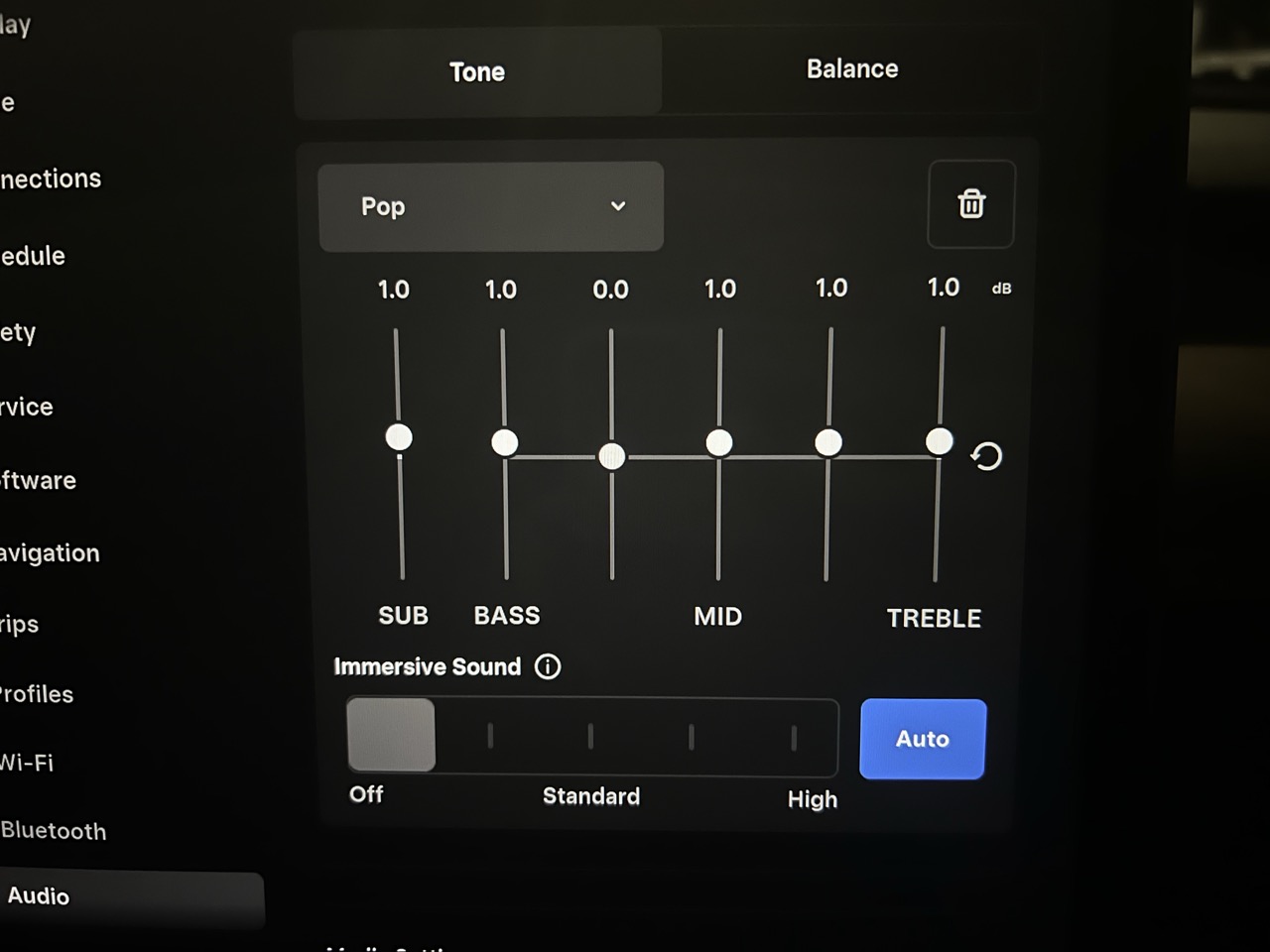
For a Pop starting point on your Tesla Model Y’s EQ (equalizer), try Subwoofer +1 (if equipped), Bass +1, Bass/Mid 0, Mid +1, Mid/Treble +1 and Treble +1, following the controls from left to right. Compare it with all sliders at zero before keeping it. For stronger bass, guitar-driven music or a more restrained acoustic presentation, use the genre settings below.
Reviewed November 10, 2026, this guide covers the 2020–2024 Model Y and the refreshed Model Y covered by Tesla’s 2025+ manual, also known as Juniper. Check your audio equipment and current software before following the steps below. The numerical presets are our suggested listening starting points. They have not been validated in vehicle listening tests or frequency-response measurements, and are not Tesla-approved settings.
Jump to: with-Subwoofer presets · without-Subwoofer presets · setup steps · older Model Y and Juniper · fine-tuning.
Recommended Model Y EQ settings by music genre
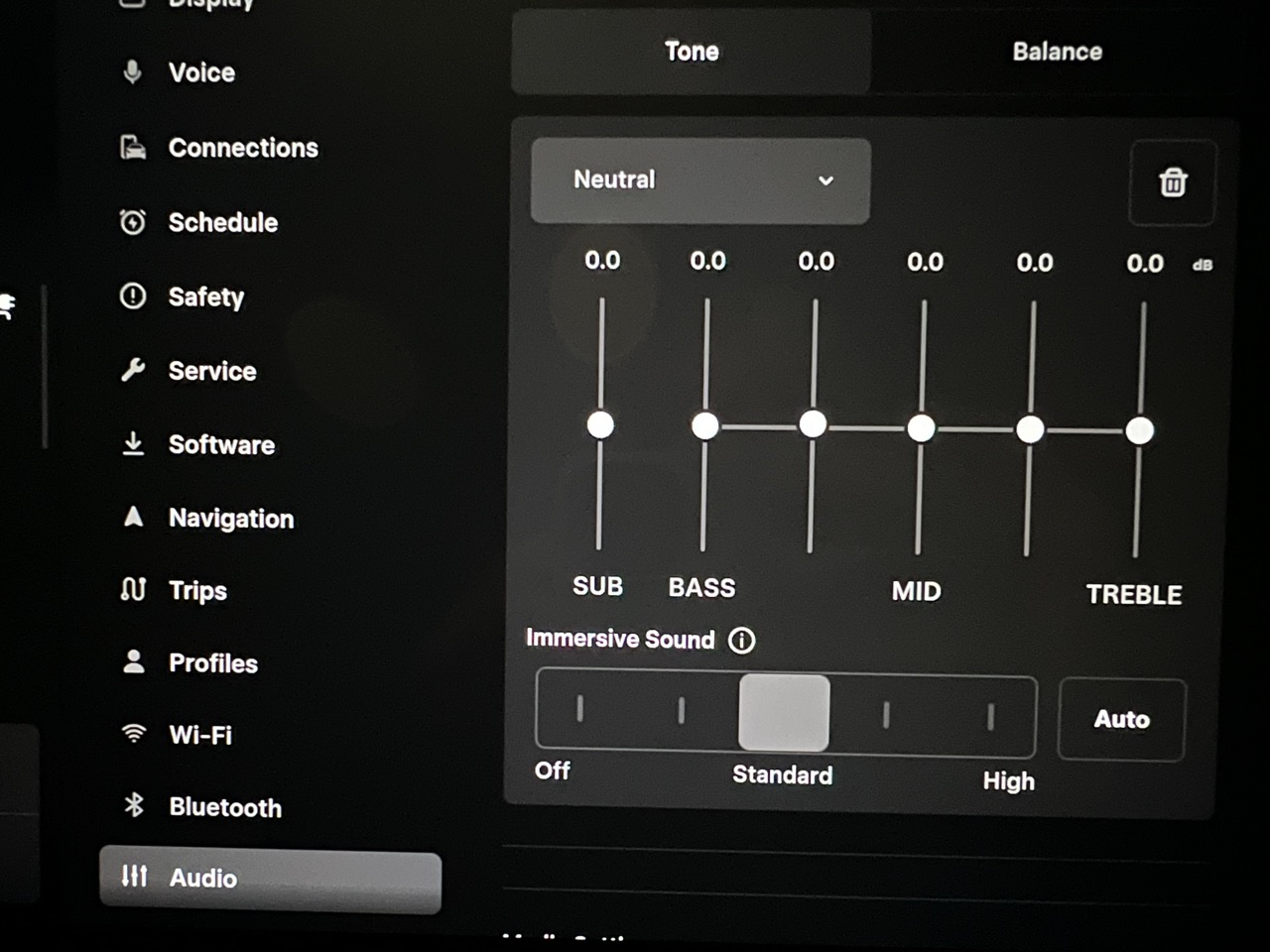
While parked, save a neutral reference first: Subwoofer at zero if present, all five Tone bands at zero, and balance centered. Zero is a comparison point; it does not mean the sound measured at your seat is acoustically flat.
The signed numbers below are target values on the Tone screen, not increments to add to an existing preset. Enter them from neutral, using the closest available value if your interface differs. Keep the same source, listening volume, balance and Immersive Sound setting while comparing presets.
The table headings follow the controls from left to right: Sub = Subwoofer, B = Bass, B/M = Bass/Mid, M = Mid, M/T = Mid/Treble, T = Treble. Sub is the first slider where equipped; without it, start at B.
Vehicle shown in all photos: 2022 Model Y, software 2026.26.300.12. Select a photo to view it at full size.
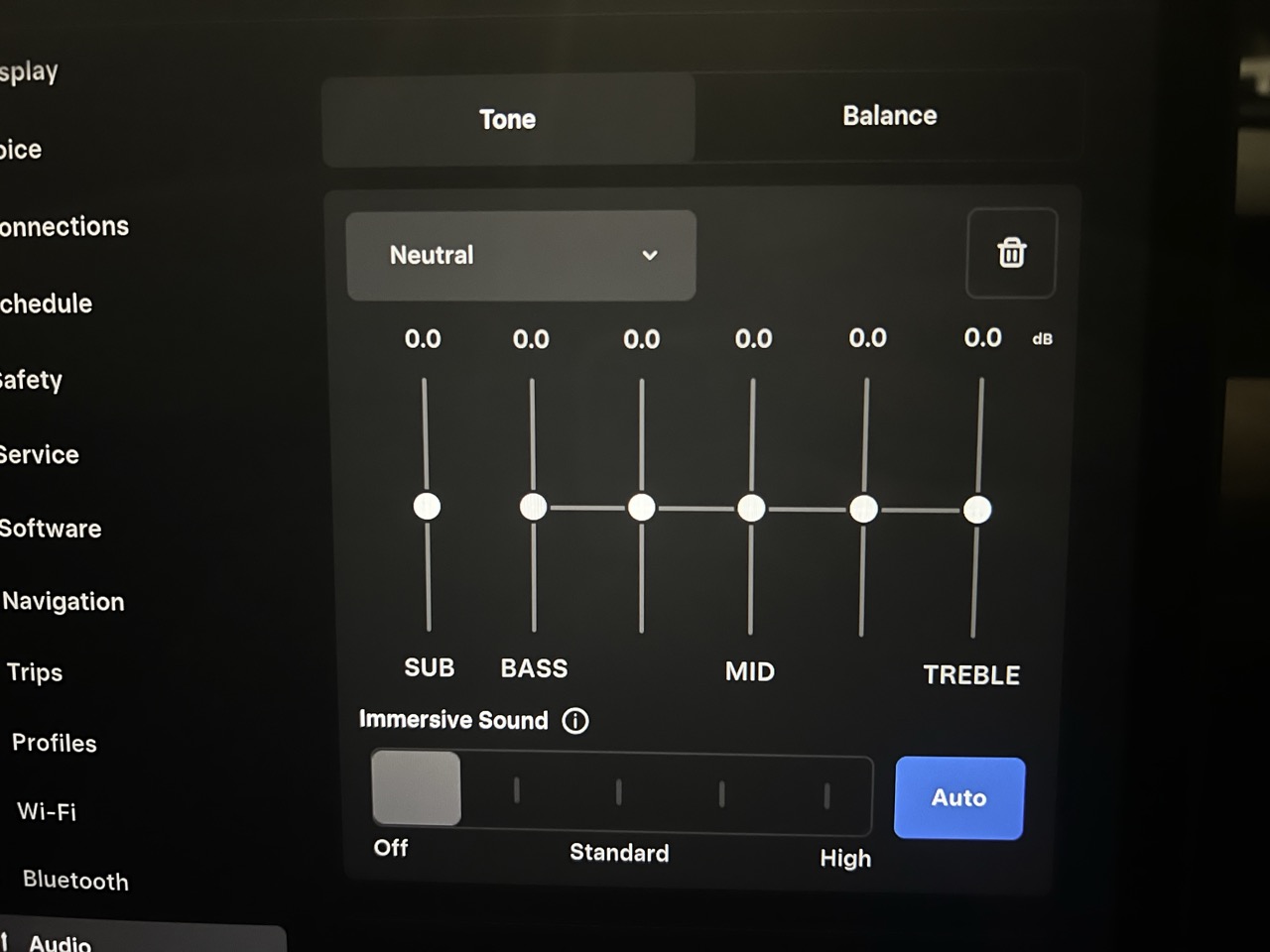
Model Y with a separate Subwoofer control
These are modest preference curves for original audio equipment. They can be tried in both a 2020–2024 Model Y and a refreshed Juniper with the matching controls. The generation-specific checks below explain when to change them. They are not corrections calculated from either generation’s speaker count.
| Music | Sub | B | B/M | M | M/T | T |
|---|---|---|---|---|---|---|
| Pop | +1 | +1 | 0 | +1 | +1 | +1 |
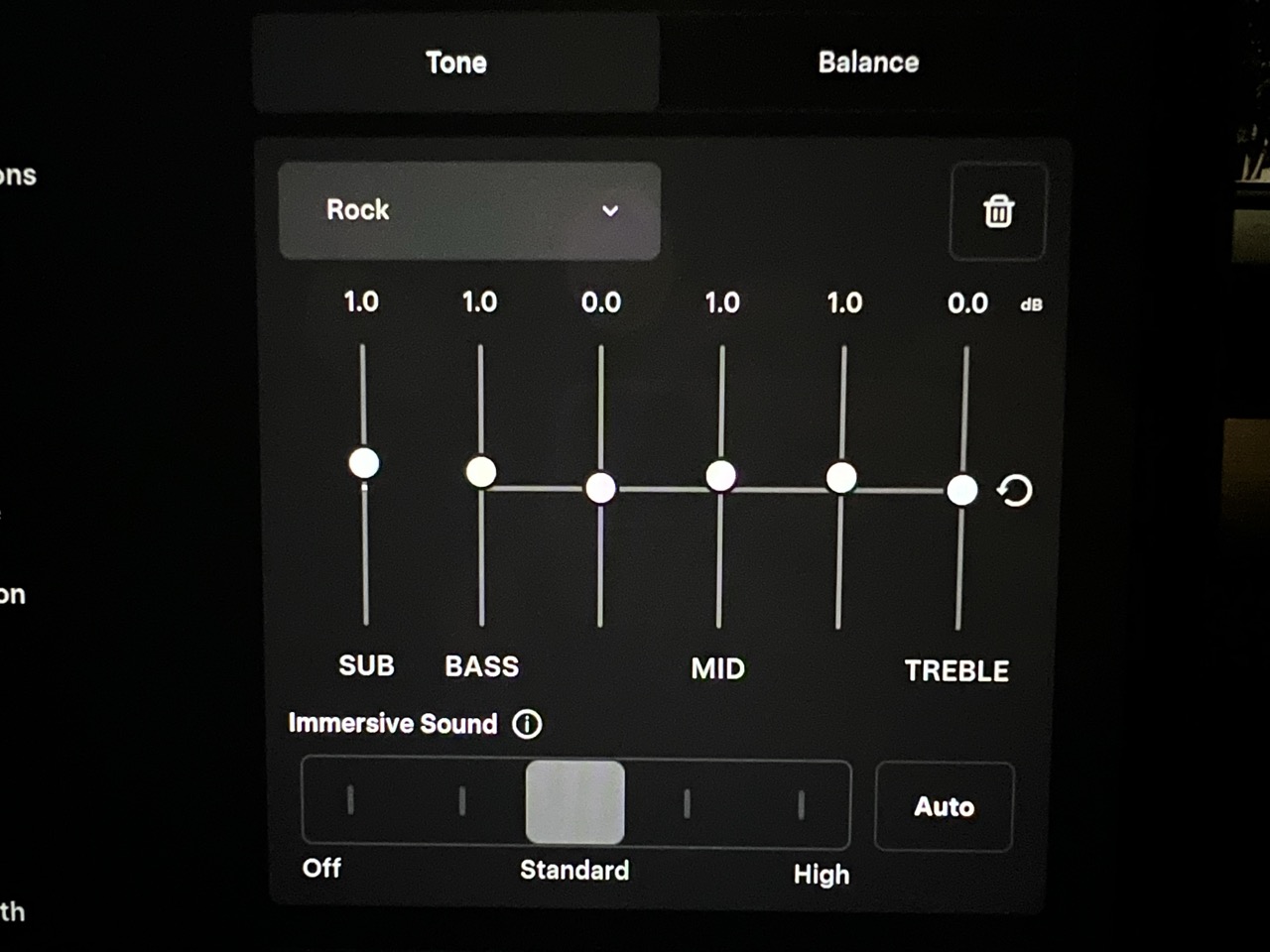
| Rock | +1 | +1 | 0 | +1 | +1 | 0 |
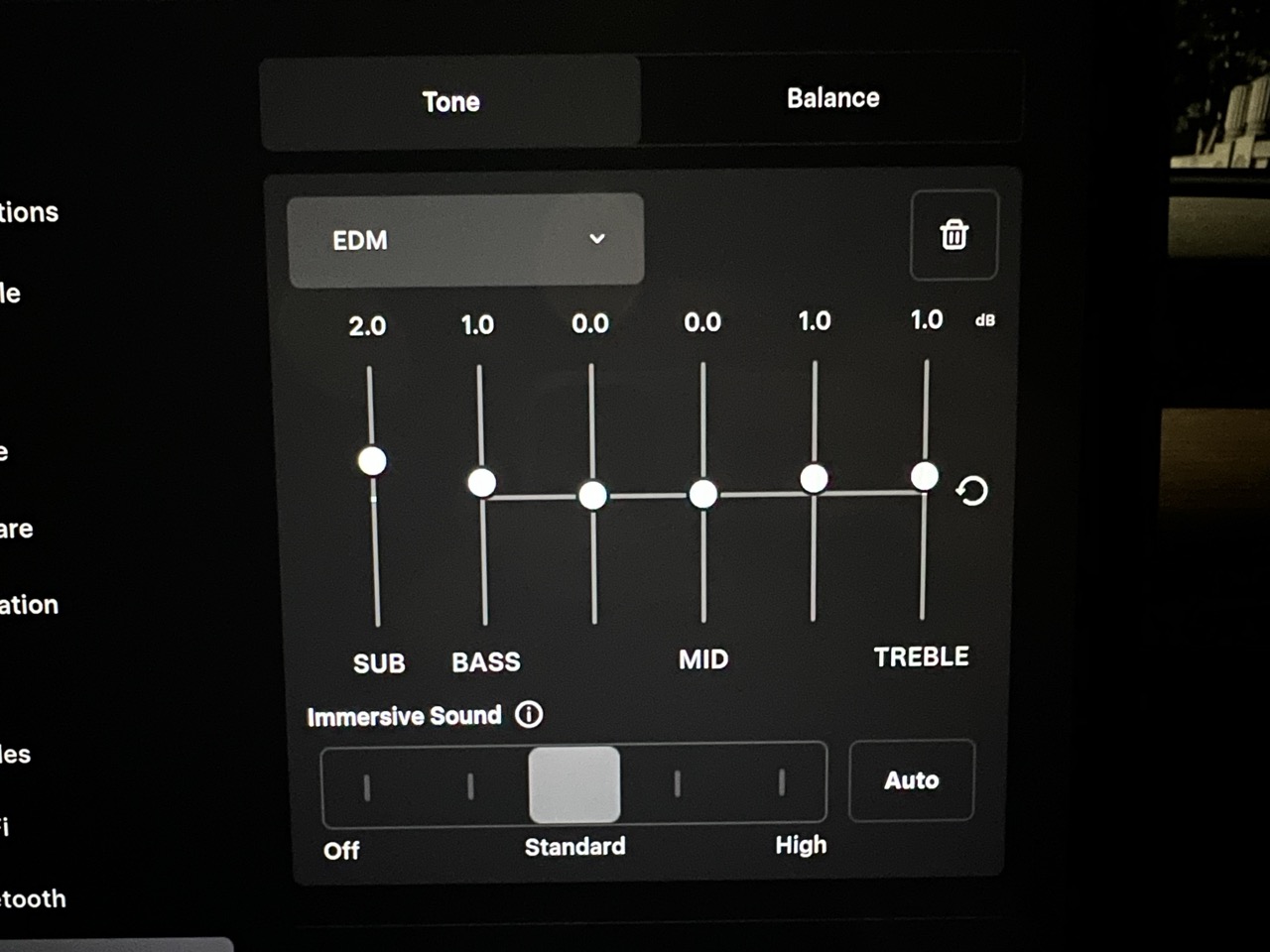
| EDM | +2 | +1 | 0 | 0 | +1 | +1 |
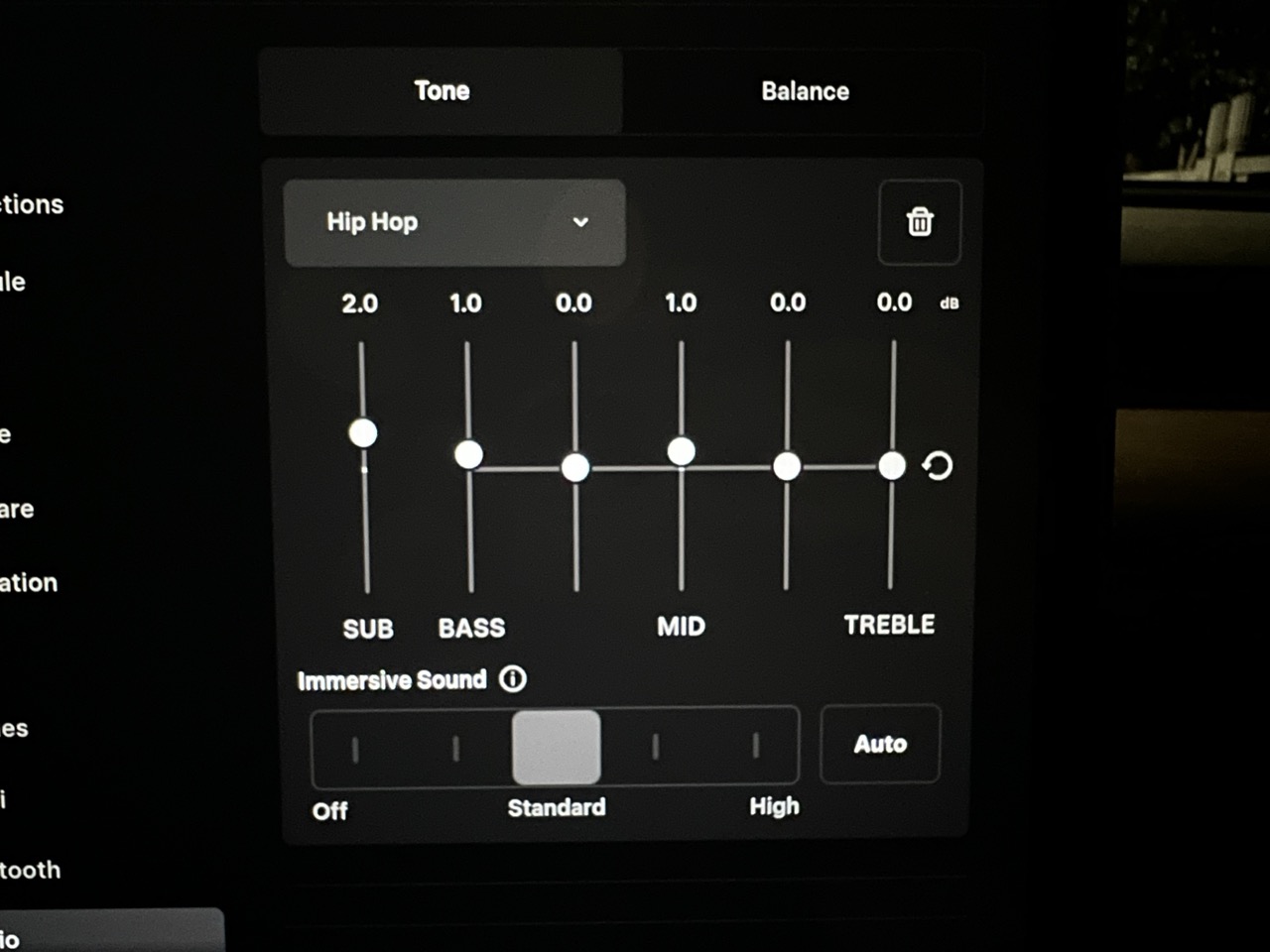
| Hip-hop | +2 | +1 | 0 | +1 | 0 | 0 |
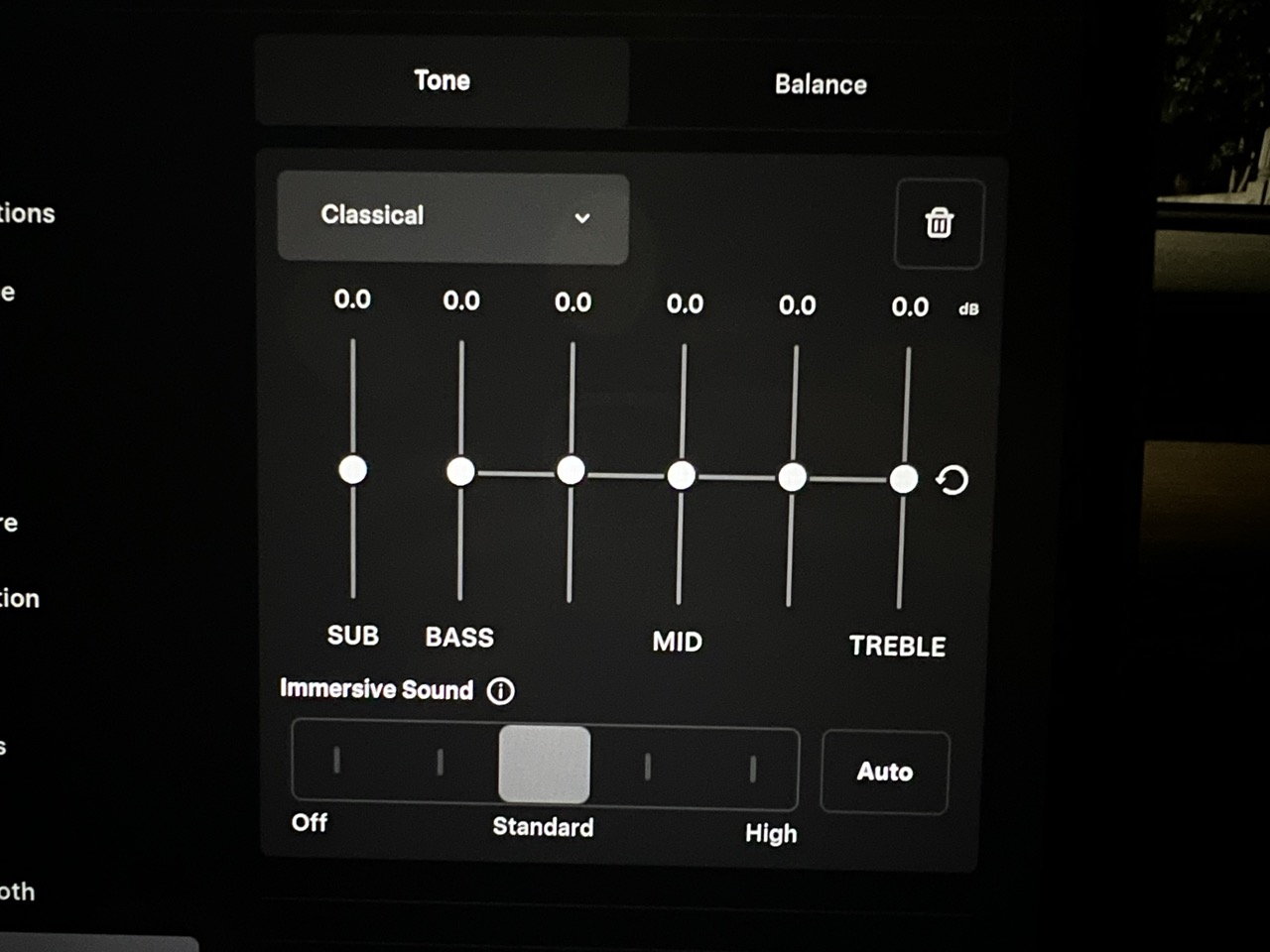
| Classical | 0 | 0 | 0 | 0 | 0 | 0 |
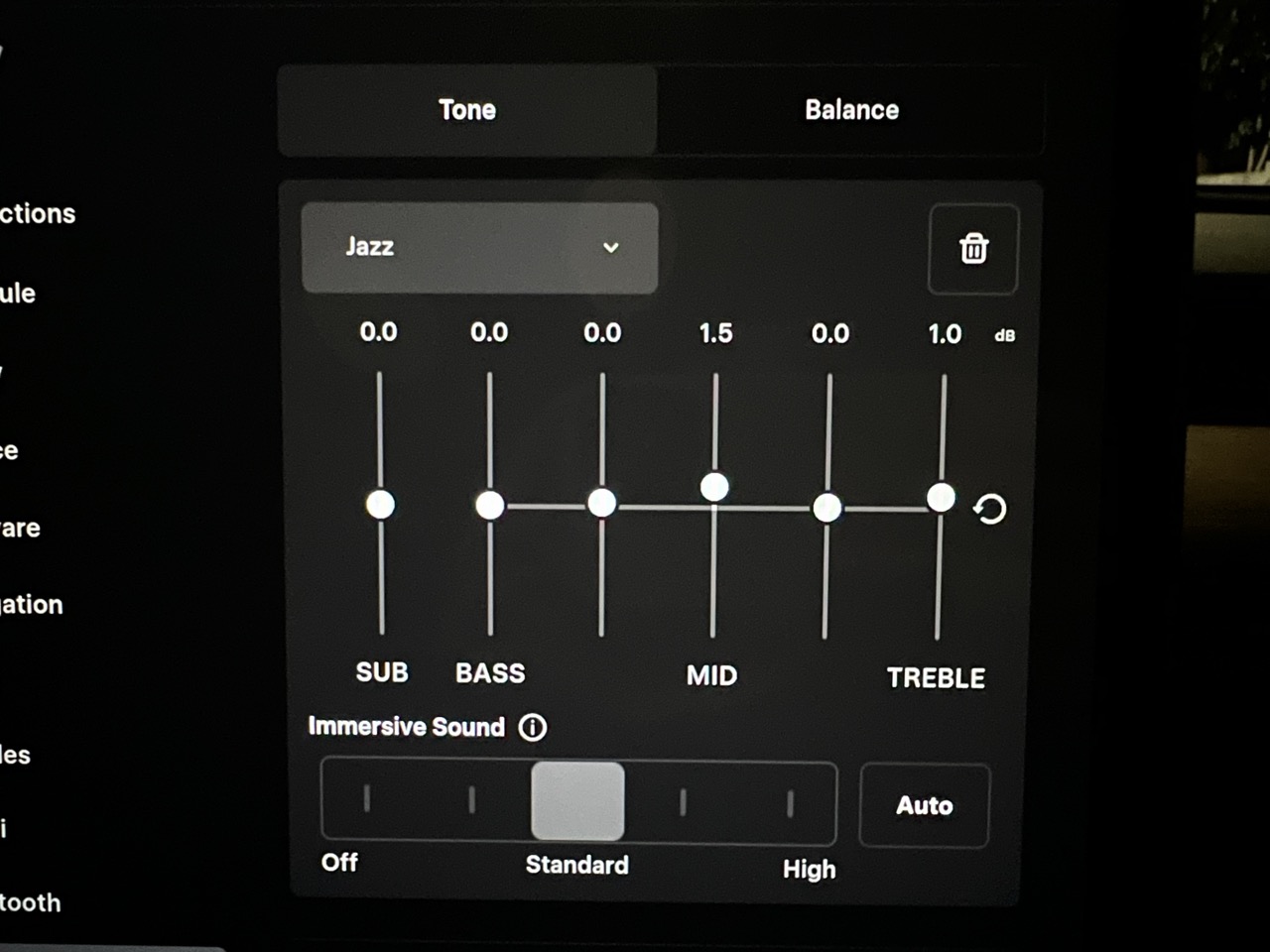
| Jazz | 0 | 0 | 0 | +1 | 0 | +1 |
Model Y without a separate Subwoofer control
Use this alternative when your vehicle lacks that control. Do not identify the package from the RWD badge alone. These suggestions apply to either generation with matching controls, subject to checking the actual equipment.
| Music | B | B/M | M | M/T | T |
|---|---|---|---|---|---|
| Pop | +1 | 0 | +1 | +1 | +1 |
| Rock | +1 | 0 | +1 | +1 | 0 |
| EDM | +1 | 0 | 0 | +1 | +1 |
| Hip-hop | +1 | 0 | +1 | 0 | 0 |
| Classical | 0 | 0 | 0 | 0 | 0 |
| Jazz | 0 | 0 | +1 | 0 | +1 |
The five Tone values deliberately stay the same. Without a separate Subwoofer control, skip that adjustment rather than transferring its +2 to Bass. A larger Bass boost is not an equivalent replacement for a subwoofer. For EDM or Hip-hop, try Bass +2 only as a separate comparison if +1 still sounds too light; return to +1 if notes blur, voices become harder to follow or you hear rattles.
Why choose these settings?
Pop / vocal pop: The small Mid and Mid/Treble lifts aim to give the singer more presence, while the low-end lift adds weight to the beat. Bass/Mid stays at zero to avoid deliberately adding thickness. If consonants become sharp, return Mid/Treble to zero first.
Rock / alternative: The intention is to add drum weight and keep guitars and vocals audible in a busy arrangement. Treble stays at zero because this preset prioritizes presence over extra top-end brightness. If distorted guitars or snare hits become tiring, return Mid/Treble to zero; if the mix becomes too dense, try Bass/Mid −1 separately.
EDM / dance: Subwoofer +2 is the strongest low-end emphasis in these starting curves, while Mid stays at zero. The aim is a fuller bass line with some added attack and brightness. If bass dominates the melody, reduce Subwoofer to +1 before adding anything else. Some heavily bass-emphasized recordings may sound better at zero.
Hip-hop / R&B: The low-end emphasis aims to give bass lines weight, with a small Mid lift for the voice. Leaving both upper bands at zero offers a softer alternative to the EDM preset. If the voice gets buried, reduce Subwoofer to +1 before increasing Mid further.
Classical / orchestral: Neutral is the recommendation here. It lets you judge the recording’s balance before choosing to emphasize a section of the orchestra. If strings sound sharp in your car, compare Treble −1; if bass is too prominent, try Subwoofer −1 where available. Neither change is required merely because a track is classical.
Jazz / acoustic: The small Mid and Treble lifts aim to bring voices, instruments and cymbal detail a little forward, with no added bass weight. If piano or voices become too prominent, return Mid to zero. If cymbals become sharp, return Treble to zero instead.
These choices express listening goals, rather than rules about how a genre should sound. The restrained boosts and the advice to reduce an excess before adding more elsewhere follow general EQ principles described by iZotope. That audio-production guidance does not establish the numerical values for a Model Y.
Quick start: adjust your Model Y EQ
- While parked, photograph your existing settings so you can return to them.
- Open Controls > Audio, or use the audio settings icon above the volume controls where available.
- Find Tone and begin with a neutral curve. Leave the separate Subwoofer control neutral if your vehicle has one.
- Center the balance and keep the same Immersive Sound setting throughout the first comparison.
- Replay the same passage at a comfortable, consistent volume. Make the smallest available change to one slider, then compare with your starting setting.
- Keep a change only if it helps across more than one familiar song. Save a named preset if your software supports it.
Tesla documents the audio controls in its 2020–2024 Model Y Media guide and current Model Y Media guide. Menu labels and available functions can differ on your vehicle.
Which Model Y audio system does this apply to?
2020–2024 Model Y vs. refreshed Model Y / Juniper
Tesla publishes separate manuals for the two vehicle families. That is a useful starting point for choosing instructions, but it does not establish a universal EQ curve for either generation.
| Vehicle family | What to check before copying a setting |
|---|---|
| 2020–2024 Model Y, including a 2022 or 2023 vehicle | Use the matching manual and inspect your current Tone screen. An old screenshot may describe an earlier software interface. |
| Refreshed Model Y, covered by Tesla’s 2025+ manual | Use the newer manual and confirm your actual audio configuration. A preset from the earlier vehicle is a listening experiment, not a validated match. |
| Any year with different audio equipment or aftermarket changes | Establish a fresh baseline in that vehicle before applying someone else’s recommendations. |
Both generations’ current Media guides describe five Tone bands, with additional controls where equipped. A different model year alone is not evidence that a particular slider needs a different value. Equally, similar-looking screens do not prove that two cars have identical audio hardware.
There are documented changes behind the refresh. In Tesla’s January 2025 launch comparison, printed page 18, the outgoing Long Range All-Wheel Drive was listed with 13 speakers and one subwoofer, versus 15 speakers and one subwoofer for the New Model Y Launch Series Long Range All-Wheel Drive. Those figures describe that particular comparison, not every earlier or later Model Y.
Tesla also describes acoustic glass and improved cabin quietness in its New Model Y introduction. These changes are reasons to reassess a familiar preset in the refreshed car. They do not tell us that its Bass or Treble slider should move by a specific amount.
RWD, AWD, Long Range and Performance
Do not use the badge alone to decide which EQ screenshot applies. Tesla says feature availability depends on the market, vehicle configuration, purchased options and software. A feature mentioned in a manual is not a promise that every Model Y has it. See Tesla’s feature availability statement.
Before choosing a starting point, check:
- Whether your Tone screen includes a separate Subwoofer control.
- Whether Immersive Sound is available.
- Whether you have the original audio equipment or modifications.
- Which software version and audio source you are using.
Tesla recommends the owner’s manual on your own touchscreen for vehicle-specific information. Its software support page also explains where to check your installed version.
What the audio controls do
With Subwoofer equipped, the controls run from left to right as Subwoofer, Bass, Bass/Mid, Mid, Mid/Treble and Treble. Without Subwoofer, begin with Bass. The current Model Y manual describes the separate subwoofer adjustment and the five Tone bands. The following descriptions are listening cues, not published Tesla crossover frequencies or measurements of your cabin.
| Control | What to listen for when changing it |
|---|---|
| Subwoofer, if present | A separate low-end adjustment at the far left. Keep it fixed while evaluating a change to Bass. |
| Bass | The weight of kick drums and bass notes. Check whether extra weight makes the rest of the track harder to follow. |
| Bass/Mid | Warmth and thickness. Excessive low-mid emphasis can make music sound congested. |
| Mid | The body of voices and many instruments. Compare the whole arrangement, not only the lead vocal. |
| Mid/Treble | Presence and attack. Check guitar edges, snare hits and consonants. |
| Treble | Brightness and high-frequency detail. Listen for cymbals or vocal sibilance becoming tiring. |
Balance changes where sound is focused in the cabin. Immersive Sound, where equipped, changes the presentation; the manual also describes an Auto option. Evaluate those separately after settling on your Tone settings.
How to adapt the presets for older Model Y cars and Juniper
Choose the genre curve by what you want to hear, and the control set by your actual audio package. There is no verified fixed offset between the two generations in the sources cited here. The same starting values are intentional; any different final values should follow a comparison in the specific car.
| Vehicle / audio configuration | Recommended starting choice | What should determine a different final setting? |
|---|---|---|
| 2020–2024 Model Y with Subwoofer control | Use the with-Subwoofer genre table. This includes a 2022 or 2023 car with matching equipment. | Listen for bass masking voices, dense guitars or sharp cymbals; use the genre-specific first adjustment above. |
| Refreshed Model Y / Juniper with Subwoofer control | Begin from neutral, then compare the same with-Subwoofer genre table. | Reassess in the refreshed cabin instead of importing your old saved curve. The documented hardware and quietness changes do not specify an EQ correction. |
| Either generation without Subwoofer control | Use the no-Subwoofer table. | Judge how much Bass emphasis remains useful without masking the rest of the music; do not add the missing Subwoofer value to Bass. |
| Either generation with changed speakers, amplifier or sound processing | Use neutral to establish a new reference. | Follow the equipment maker’s guidance and evaluate the modified system before adopting a factory-equipment suggestion. |
For example, a 2022 Model Y with a subwoofer playing Rock can start at +1 / +1 / 0 / +1 / +1 / 0. If guitars sound sharp, compare +1 / +1 / 0 / +1 / 0 / 0, changing only Mid/Treble. That second curve is an answer to the sharpness you hear, not a mandatory 2022 setting.
A Juniper with a subwoofer playing EDM can start at +2 / +1 / 0 / 0 / +1 / +1. If the bass dominates, compare +1 / +1 / 0 / 0 / +1 / +1, changing only Subwoofer. If it already sounds balanced with Subwoofer +2, leave it there. The same listening test is valid in an older car with the corresponding controls.
For Classical in either generation with a subwoofer, begin at 0 / 0 / 0 / 0 / 0 / 0. Without a subwoofer, use zero for each of the five available Tone bands. A newer car does not automatically call for more bass or less treble.
All six-value sequences above follow the screen from left to right: Sub / B / B/M / M / M/T / T. If Subwoofer is absent, omit the first value and use the remaining five in order. Save the version you prefer with a name such as Rock 2022 or EDM Juniper, along with your software version and audio configuration in your notes.
Fine-tune without losing your reference
Choose a short passage you know well: a voice you recognize, bass notes with distinct pitches, and percussion you can follow. Keep the same source, track version and seating position. Use two or three other familiar songs before deciding that a change is an improvement.
Replay the passage, change one control by one small step, and compare with your saved reference. Avoid increasing the master volume while judging the new setting. If your music app has its own EQ, keep that unchanged during the comparison so you know which adjustment you are hearing.
If vocals are still hard to hear
Check whether too much low-end or low-mid emphasis is obscuring them before boosting several upper bands. If a Bass/Mid reduction does not help, restore it and try a small Mid adjustment instead. The recording itself may place the voice behind the instruments; one song is not a reliable basis for changing every band.
If bass sounds different from song to song
Try several tracks before adding more low-end. Keep Bass and Subwoofer separate in your notes. A setting that improves one bass-light recording may make a bass-heavy track overwhelming. If lowering the listening volume resolves an unpleasant sound, do not keep adding EQ to compensate.
If cymbals or voices sound sharp
Begin with a small Treble reduction from your selected preset. If it removes too much detail without solving the problem, restore it and separately try a small Mid/Treble reduction. Do not lower both at once on the first attempt; you will lose the comparison.
Compare Immersive Sound last
Once the Tone curve suits you, compare the available Immersive Sound choices on the same material and retain the presentation you prefer. Then check the balance from the seat you normally use. A preference for the driver’s seat may not be the best compromise for passengers, so compare occupied seats if you often travel together.
Save a preset and return to neutral
On software with custom presets, Tesla’s manual describes Add To New Preset after adjusting Tone. Name your setting so you can distinguish it from your reference. Delete Preset removes a selected custom preset; it is not described as a reset command for every audio setting.
To make your own neutral reference, return the tone sliders to their centered positions and the balance to the center. Restore Immersive Sound separately to the choice recorded before your comparison. If custom presets are unavailable, keep a photo or written record of the values instead.
Model Y EQ questions
What are the best EQ settings for a 2022 Model Y?
Start with the 2020–2024 instructions and check your current audio screen. A 2022 registration or model year does not, by itself, establish your speaker equipment or preferred sound. Use neutral as a comparison, then choose a genre preset from the table matching your Subwoofer control. For Pop with a subwoofer, the proposed start is +1 / +1 / 0 / +1 / +1 / +1, in Sub / B / B/M / M / M/T / T order. Without Subwoofer, omit the first value.
Does a Juniper Model Y need different EQ settings?
Recheck the settings in the refreshed car rather than assuming an older recommendation transfers unchanged. This guide uses Tesla’s 2025+ manual for the refreshed family. Without measurements or a controlled comparison of the specific configurations, we cannot assign a universal correction just because the car is newer.
Why is the Subwoofer or Immersive Sound option missing?
Check the owner’s manual in your vehicle and its actual configuration. Availability can differ; the absence of a control alone does not establish a fault. If your car’s manual indicates that it should be present, consult Tesla support rather than following steps for a differently equipped car.
Are these Tesla’s official recommended EQ values?
No. The cited Media sections explain the controls and do not prescribe a best numerical curve. Our numerical presets are editorial listening suggestions that still need vehicle testing. A preset attributed to Tesla elsewhere needs its own original source and stated vehicle applicability.
Should I use one preset for every song in a genre?
Use the genre preset as a starting preference, then check several recordings before saving it. A bass-heavy Pop track may sound better with Subwoofer returned to zero than with the suggested +1. Our music-genre EQ guide offers other tonal preferences to compare; none is a measured correction for every Model Y configuration.
Sources
Tesla’s web manuals are updated over time. The vehicle information and controls above were checked against these sources on November 10, 2026. Use the manual and release notes in your own car when its interface differs.
- Tesla owner’s manual selector: separate vehicle-family manuals.
- 2020–2024 Model Y Media guide: older-family audio instructions.
- Current Model Y Media guide: refreshed-family controls and presets.
- Tesla’s January 2025 launch comparison, printed page 18: the specific audio systems compared at launch.
- Tesla’s New Model Y introduction: the refresh and cabin quietness changes.
- Tesla feature availability statement: configuration, market and software limitations.
- Tesla software support: installed software and vehicle-specific owner information.
- iZotope EQ cuts and boosts: general audio principles, not vehicle measurements.